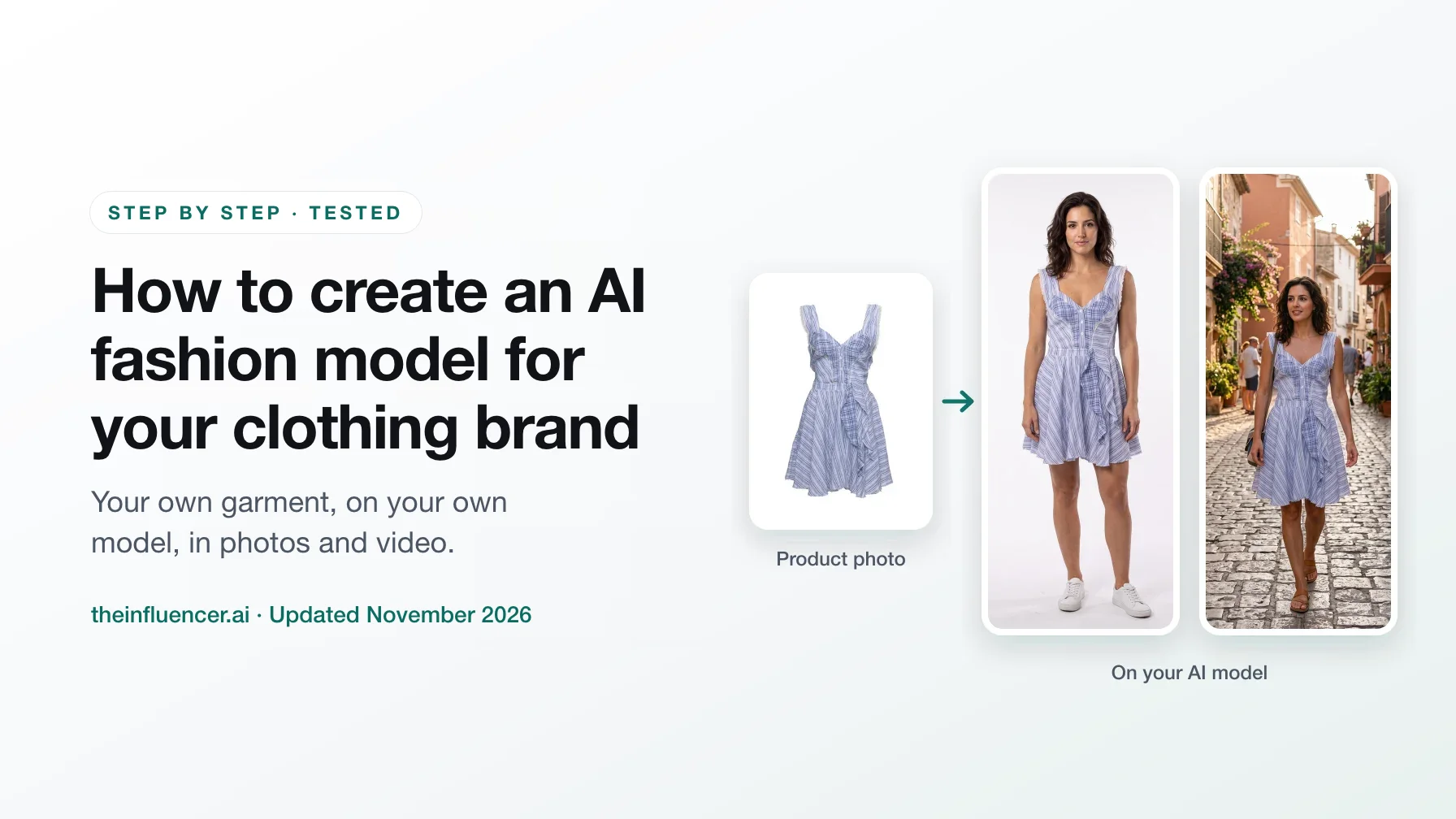
To create an AI model for your clothing brand, design one model and save them, upload a clear photo of a garment, and ask for photos of that model wearing it. Then compare every photo with the product photo and keep the ones that match. You get on-model photos without a photoshoot, and the same AI fashion model can wear the whole collection: studio shots for your online store, lifestyle shots for social, and short videos.
The step most guides skip is the checking. AI gets the garment right most of the time, not every time, and a photo that changes your product is worse than no photo. So this guide covers the checking as well as the making, and shows the photos that came back wrong.
What we tested for this guide
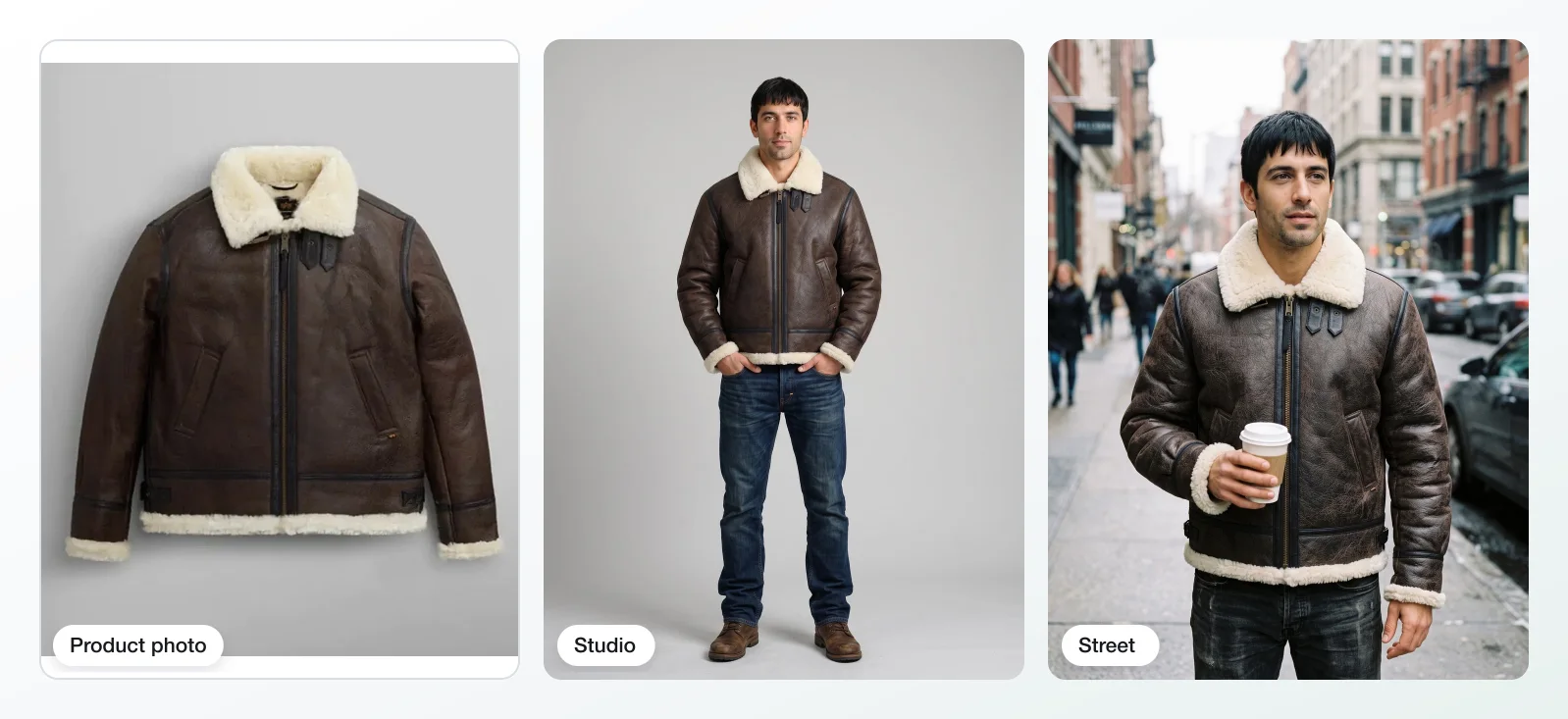
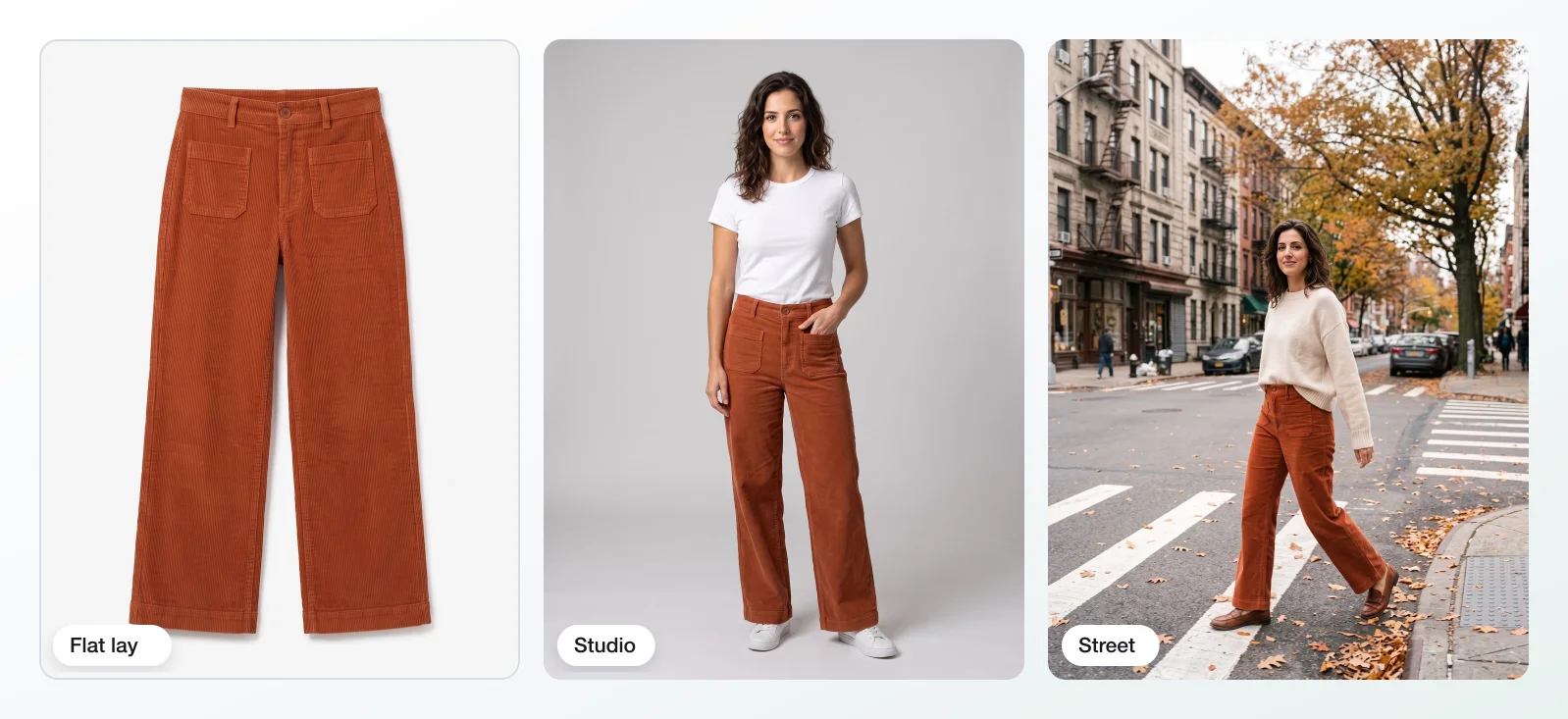
On November 20, 2026 we put four garments on three saved models with The Influencer AI: a shearling jacket, corduroy trousers, a hoodie with printed words and a patterned dress. Of 24 photos, 21 matched the garment. The jacket, trousers and hoodie matched in 12 of 12; the dress in 9 of 12. The full results are below, and nothing on this page is retouched.
In this guide
Which kind of AI fashion model tool do you need?
There are two kinds of AI fashion model generator, and they do different jobs. Pick by what you need the photos for.
| If you need | Use |
|---|---|
| Hundreds of product pages from flat-lay photos, every item on a model, as a catalog job | A catalog tool. Botika and Claid are built for this, with a library of ready-made models to choose from. |
| One model your customers come to recognise, wearing your pieces in product photos, social posts and talking videos | A model you design and save yourself. That's what this guide shows, with The Influencer AI. |
The difference is who the model is. Botika and Claid give you models from a library. With The Influencer AI, an AI influencer generator, you design the model, save them, and they're yours: the same face on your product page, in your Instagram feed and in a video saying this week's line. For a small brand, that recognisable face is worth more than a new model for every item.
How do you create your brand's AI model?
In The Influencer AI, choose the model's traits in the builder, make free previews until the face is right, and save the model with a name. Make them look like the people who buy from you, in age, build and style, and give them one feature shoppers will remember, such as curls or freckles. Don't base them on a real person unless it's you or someone who has agreed.
The models in this guide are called Giulia, Marko and Sarah. Our guide to creating an AI influencer covers the builder screen by screen.
What photo of the garment do you need?
One clear photo of the whole garment on a plain background. The AI can only keep what it can see, so this photo decides how accurate the result is.
- A flat lay, a hanger shot or a ghost mannequin all work, and so does a photo of someone wearing the piece. The product photos you already have are usually enough.
- Show the whole piece, front on, with nothing cropped and nothing folded over.
- Even light, true colour. A shadow across the fabric can come back as part of the pattern.
- One garment per photo. For an outfit, add the pieces one at a time.
- Make prints and logos sharp. If you can't read the text in your photo, the AI can't either.
How do you put your clothes on an AI model?
Attach the garment photo to a photo request and describe the scene. You don't describe the garment or the model: the photo brings one and the saved model brings the other. There are two ways to do it in The Influencer AI, each 1 credit a photo, which is about 19 cents on the Starter plan:
- A new photo. In the photo form, add the garment as an element, set it to Wear, choose Tops, Bottoms or One-pieces, and write the scene.
- A photo you already have. Open it, choose Try on clothes, upload the garment and start. The pose and background stay; only the clothes change.
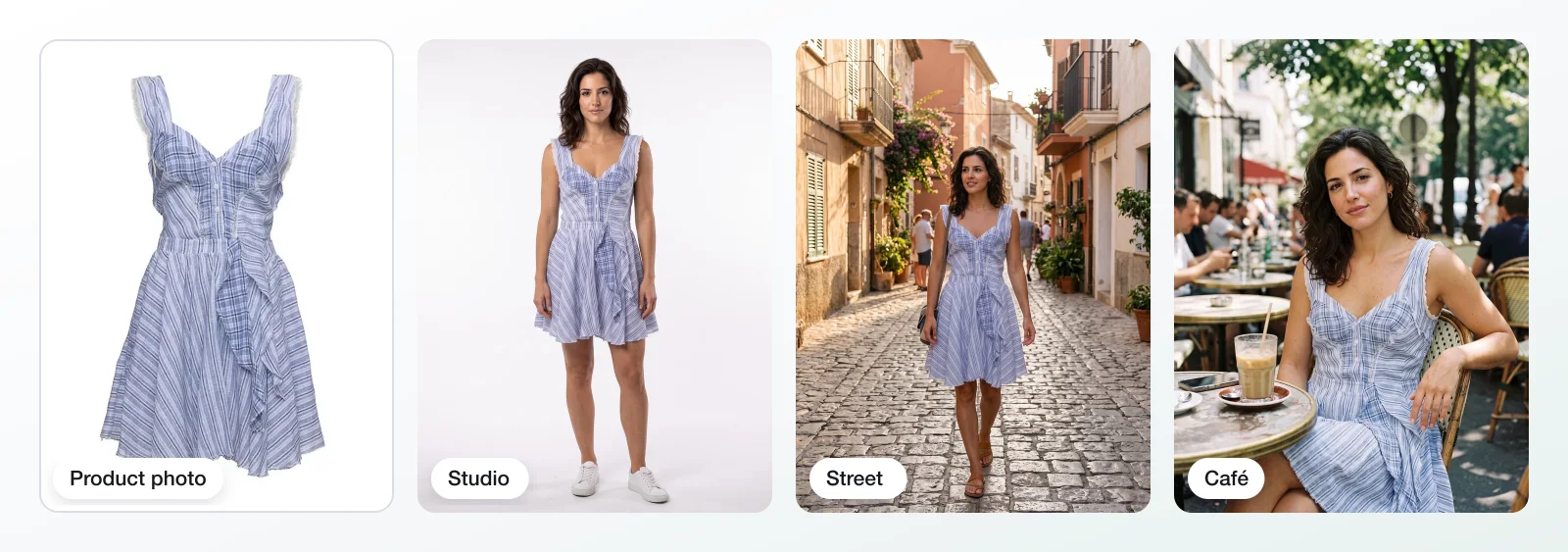
The three scene prompts, exactly as we sent them:
Studio, for the product page
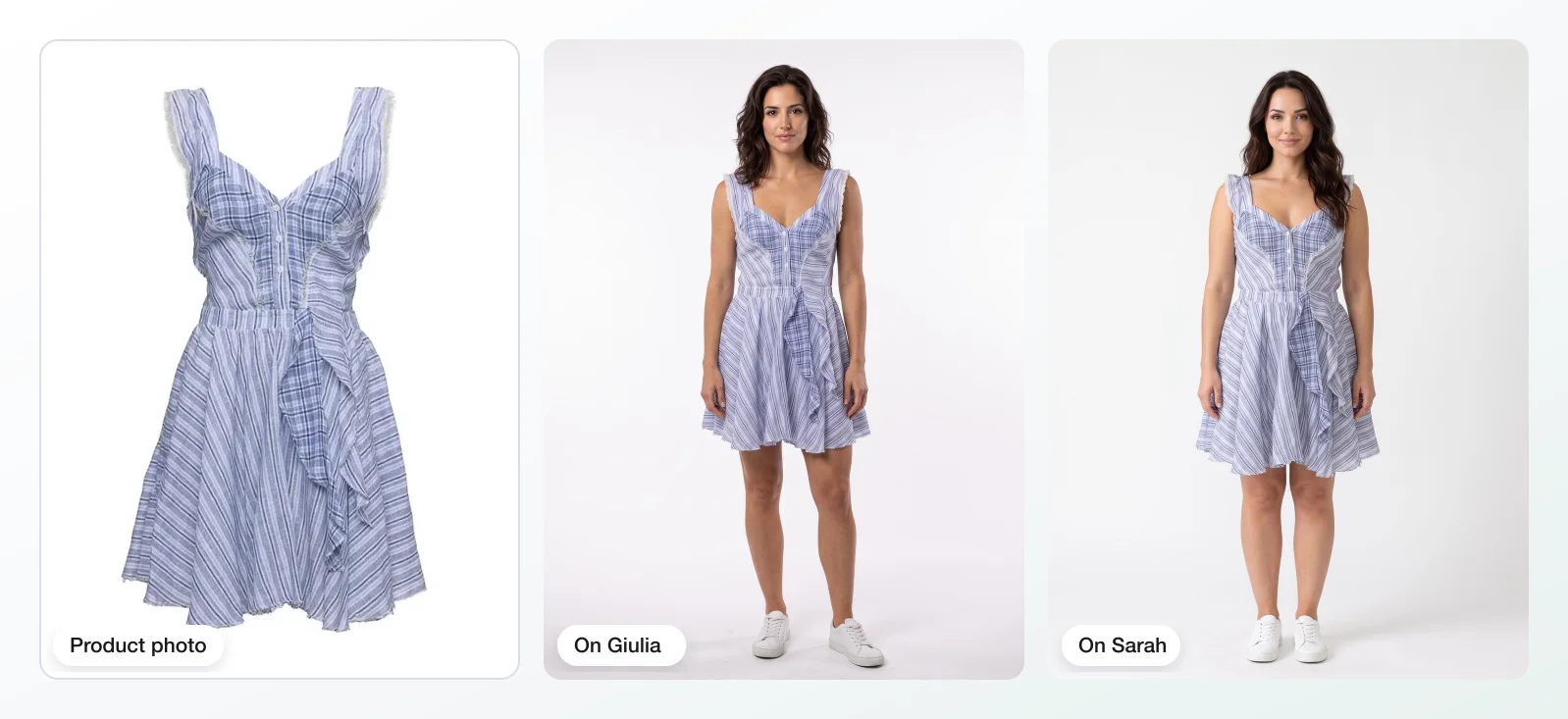
Full-body studio photo on a plain white background, standing facing the camera with arms relaxed, white sneakers, soft even light
Street, for social
Walking down a sunny cobbled street in a Mediterranean town, full-body shot, tan leather sandals, candid, golden hour
Café, for social
Sitting on a cafe terrace with an iced coffee on the table, half-body shot, relaxed, natural daylight
Or do it in ChatGPT or Claude
Add The Influencer AI to ChatGPT or Claude, attach the product photo and ask: “Put Giulia in this dress on a sunny street, full body, two options.” The photos come back in the chat, and you can say “the second one, now in a studio.” Every photo on this page was made that way. It uses the same credits as the website.
Does it work on jackets, trousers and logos?
In our test, yes: the three plainer garments matched in every photo, and the busy pattern was the one that needed retakes. We made two photos per scene and counted a photo as a match only when the cut, the pattern, the details and the model's face were all right.
| Garment | Photo we uploaded | Photos made | Matched |
|---|---|---|---|
| Shearling jacket | Product photo | 4 | 4 of 4 |
| Corduroy trousers | Flat lay | 4 | 4 of 4 |
| Hoodie with printed words | Photo of a model wearing it | 4 | 4 of 4 |
| Striped dress with checked panels and a ruffle | Product photo | 12 | 9 of 12 |
| All four | 24 | 21 of 24 |
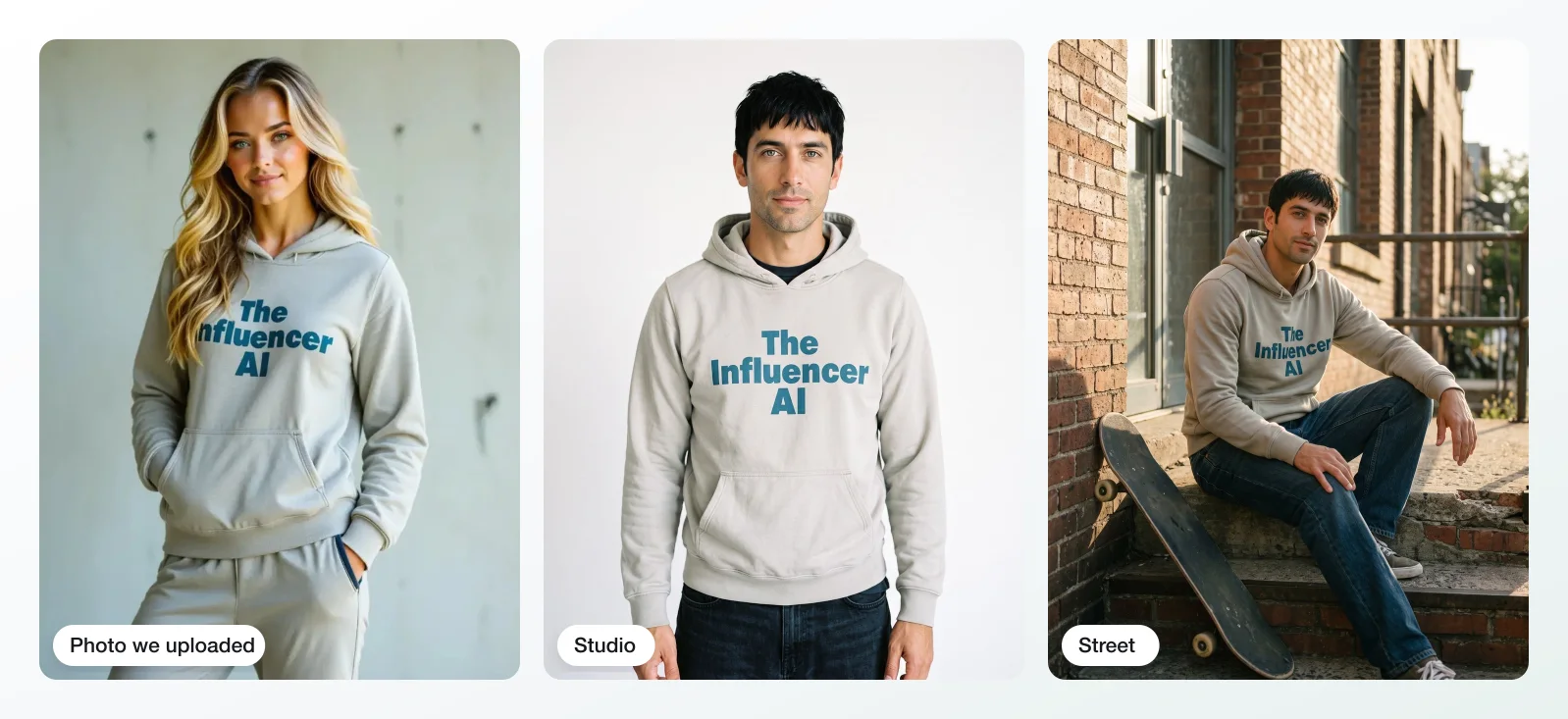
This is a small test of one tool on one day, so read it as a guide to where retakes happen, not as a guarantee. Large, clear lettering held. We didn't test small logos or care labels, which are harder.
How do you check the photos against the product?
Put each photo next to the product photo and go down a list. Make two photos per scene so you have a spare, and retake anything that changed the garment. This is the step that protects you from returns and complaints.
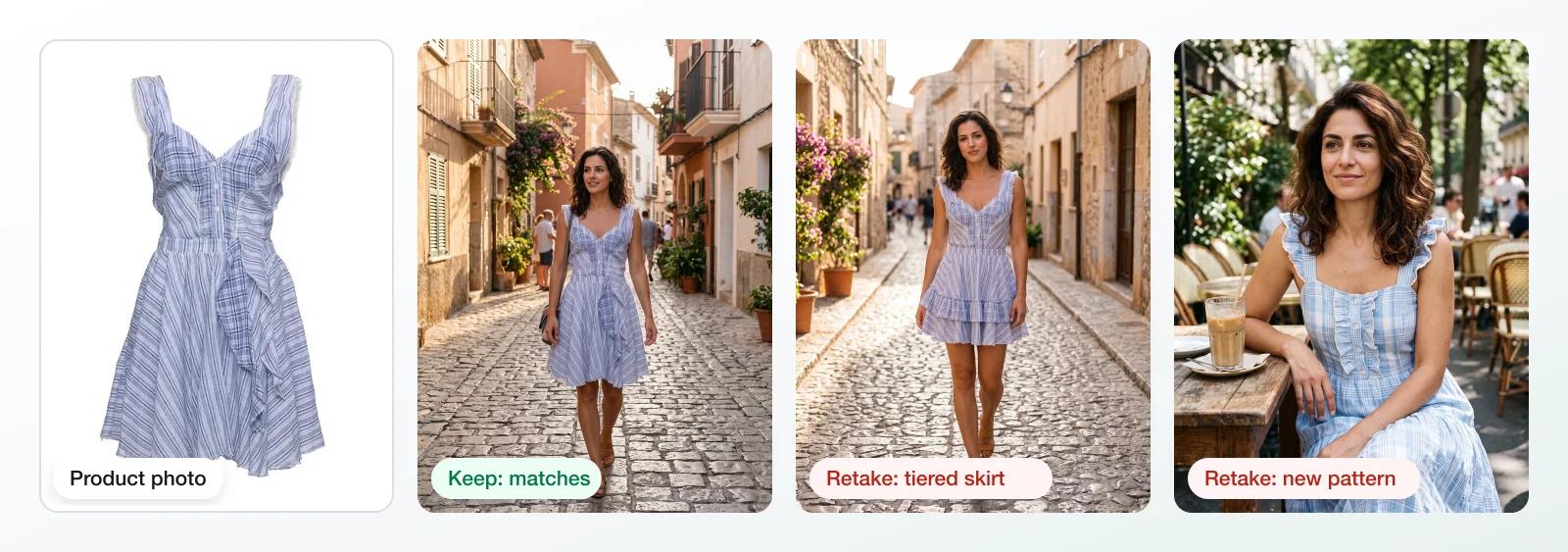
| Check | What to look for |
|---|---|
| Cut and length | Is the skirt, sleeve or hem the shape and length of the real one? |
| Pattern | Same stripes or checks, same direction, same size? |
| Colour | Compare side by side in daylight scenes, where colour shifts most. |
| Neckline and straps | These change the look of a piece more than anything else. |
| Details | Count buttons, pockets and zips. Check trims and ruffles are where they should be. |
| Logos and small text | Large prints usually hold. Small lettering is the first thing to go wrong. |
| The face | It should be your model. If it isn't, retake. |
Expect retakes on busy patterns and few elsewhere. A retake is the same request again: when we repeated the two dress scenes that had failed, three of the four new photos matched. When a photo is nearly right, edit it instead and say what to fix in plain words, which keeps the pose and the face and costs one credit.
Which photos does each piece need?
One plain shot for the product page and two or three lifestyle shots for social, all with the same model. That set covers a launch.
- Product page. Full body, facing the camera, plain white or grey background, even light. Use the same prompt for every piece so your Shopify or other online store looks consistent.
- Social. Places your customer goes: a street, a café, a market, a beach. Phone-style framing looks less like an ad.
- Formats. 3:4 for feed posts and product pages, 9:16 for Stories and Reels.
- Keep a real photo too. Leave your flat lay or hanger shot on the product page next to the on-model one, so shoppers can see the piece itself.
- A second model, if your range needs one. Menswear and womenswear, or two builds for the same piece. Every plan includes at least 2 new models a month.
How do you make a video of the model wearing it?
In The Influencer AI, open an on-model photo, describe the movement, and write what the model says in quotes. The photo is the first frame, so the garment and the face start out right. Then watch the garment through the whole clip, the same way you checked the photos.
The prompt
She keeps walking towards the camera along the cobbled street, the skirt of the dress moving with each step. She smiles at the camera and says "New in this week. This is the one I'd pick." Soft street ambience.
Made from the street photo above: 5 seconds with sound, 5 credits. The dress kept its stripes and ruffle as she walked.
The same person who wears the piece on your product page can announce the drop, answer a common question, or do a try-on in a Reel. If you also want them to run an account of their own, see how to create an AI Instagram model.
Try it on one piece
Design your model for free, then put one garment on them. Photos and videos need a plan or the 3-day free trial; plans start at $19 a month, month to month.
What can't an AI fashion model do?
It shows how a piece looks, and it can get details wrong. Plan around four limits:
- Fit and sizing. An AI photo can't tell a shopper whether a medium fits them. Keep your size chart, and don't caption AI photos with fit claims.
- Small text and fine logos. Large printed words held in our test. Small lettering is harder, so check it every time and retake or edit when it's off.
- The back of the garment. The AI only knows the side you showed it. For a back view, upload a photo of the back.
- Real customers. A photo of your AI model isn't a customer photo or a review, and shouldn't be presented as one.
What does a 10-piece drop cost?
About 65 credits, which fits inside the 100 credits of the Starter plan at $19 a month. A credit works out at about 19 cents on that plan, and a photo is 1 credit, so you can price a drop before you make anything.
| What you make | Credits |
|---|---|
| 10 pieces, 4 photos each (two scenes, two photos per scene) | 40 |
| 10 retakes: one photo in four, the rate our patterned dress needed | 10 |
| 3 talking videos of 5 seconds | 15 |
| Total | 65 |
Plans are month to month and you can cancel anytime. See plans and prices. If you only want to try a garment on a photo, without saving a model, there's a virtual try-on tool too.
Give your brand a face
Design a model, put your first piece on them, and check it against the product photo. Building the model is free, then from $19 a month, cancel anytime.
Create your AI modelQuestions people ask
Can I put my own clothes on an AI model?
Yes. Upload a clear photo of the garment, attach it to a photo request as something to wear, and the model is shown wearing it. Compare the result with the product photo before you use it: in our test a jacket, trousers and a printed hoodie matched in 12 of 12 photos, and a patterned dress in 9 of 12.
What is an AI fashion model?
A person made with AI who is shown wearing real clothes. A brand uploads a photo of a garment and gets on-model photos and videos back, without a photoshoot. Some tools offer a library of ready-made models; others let you design one model and keep them for every piece.
Can I use the photos in my Shopify store and in ads?
Yes. They're ordinary image files, so they upload to Shopify, WooCommerce or any other store like your other product photos, and our terms give you full commercial rights to what you make. If you also sell on a marketplace such as Amazon or Etsy, check its current rules on AI images first.
Do I need a flat-lay photo of the garment?
No. A flat lay, a hanger shot or a ghost-mannequin photo all work, as long as the whole garment is visible on a plain background in even light. A photo of someone wearing the piece works too: the hoodie in our test came from one.
Can an AI model show how clothes fit?
No. It shows how a garment looks on a body, not how your sizes fit real customers. Keep your size chart on the product page, and don't use AI photos to make claims about fit.
Can I have a male model, or several models?
Yes. You design each model yourself, so they can be any gender, age and build, and every plan includes at least 2 new models of your own a month. The jacket and the hoodie in this guide are on a male model.
Is there a free way to try it?
Designing and saving a model is free. Photos and videos need a plan or the 3-day free trial, which comes with a few credits to test with.
Do I have to say the model is AI?
Follow the rules where you publish. On Instagram, realistic AI video needs the Add AI label, and an account whose identity is an AI person needs the AI-generated profile label; a brand account that posts photos of its clothes on an AI model is not that. In the EU, the AI Act's transparency rules for AI-generated images and video have applied since August 2, 2026.
Which clothing brands use AI models?
Large ones have said so publicly. H&M announced in March 2025 that it would make digital twins of 30 of its models (FashionUnited), and Levi's said in March 2023 that it would test AI-generated models alongside human ones (ABC7).
How we made this guide, and who we are
We build The Influencer AI, so the test uses our own product. Every photo and the video were made on November 20, 2026 and are shown as they came back, including two that got the dress wrong. The dress, jacket and hoodie photos we uploaded are ones we already use on our site; the trousers flat lay was generated for the test. What Botika and Claid do is taken from their own sites, linked above. Instagram's labelling rule is from Instagram's announcement of August 31, 2026.